A Van Westendorp study exists to answer one question: what price range will the market accept for this product, and where inside that range should we launch? It asks each respondent four prices for a product: too cheap to trust, cheap but still good quality, expensive but still worth buying, and so expensive it is not worth buying. Plotting the cumulative answers gives four curves. Their intersections mark the acceptable price range and the optimal price point.
Today, it is very easy to get an AI tool to hand you an answer to that question in seconds. The hard part is producing an answer that you can defend and explain. One where the curves were built from the right variables, the intersections were calculated rather than eyeballed, and the segment that disagrees with the headline range is visible instead of averaged away.
Each step below explains the method first, so it works in Excel, R or SPSS. A shaded “In Displayr” panel then shows the same step in Displayr, with copy-paste prompts. You can use these same prompts if analyzing your pricing survey data in ChatGPT or Claude, but results may vary.
Note that the example analysis uses a synthetic dataset exploring cold brew coffee pricing. While useful for testing prompts and learning the techniques, the findings are illustrative only. When working with real survey data, always verify AI-generated calculations and interpretations before drawing conclusions.
What’s in a Van Westendorp pricing survey?
The method only actually needs four questions, but a survey that is only four questions produces a range with nothing to explain it. The template below adds the context that makes the analysis worth presenting. Typical length is six to eight minutes. Aim for at least 300 completes in any group you want to read a separate range for.
| Section | Representative questions | Format |
|---|---|---|
| Screener | Category purchase in the last 12 months; role in the purchase decision; brand currently used. | Single response |
| Concept exposure | Product description or image with no price shown. A comprehension check confirms the respondent read it. | Stimulus plus one check |
| The four price questions | At what price would it be so cheap you would doubt its quality? At what price would it feel inexpensive, with no doubts about its quality? At what price would it start to feel expensive, but still worth buying for its quality? At what price would it be so expensive that it is not worth buying? | Open numeric, one currency, same order for everyone |
| Purchase intent at a stated price | Likelihood to buy at the respondent’s own “cheap” and “expensive” prices. Optional, but it is what turns an acceptability range into a revenue curve. | 5-point scale, asked twice, stored as numbers |
| Reasons | What made you choose that price as too expensive? | Open-ended text |
| Classification | Usage frequency; price last paid in the category; household income band; region; age. | Single response and numeric |
Two practitioner notes. Ask the four prices in the same order for every respondent and report that order; randomizing them does not remove anchoring. And record the price last paid in the category, because the acceptable range is only interpretable against what people already pay.
Which analysis answers which question?
| Business question | Analysis |
|---|---|
| Did respondents give usable prices? | Consistency and outlier checks on the four price variables |
| What do people expect this to cost? | Topline distribution of each price point: median, quartiles |
| What price range will the market accept, and where is the optimum? | Price Sensitivity Meter: four cumulative curves and their intersections |
| Does the range differ by brand used, usage or income? | Price Sensitivity Meter rerun by segment |
| Which price maximizes revenue, not just acceptability? | Newton-Miller-Smith extension: likelihood to buy and revenue at each price |
| Why does the price feel too expensive? | Text categorization of the open-ended reasons, cut by price position |
Step 1: clean the price data
Pricing data fails in predictable ways. Respondents type an extra zero, give prices that run backwards (a “cheap” price above “too expensive”), or answer in cents instead of dollars. Each failure drags a curve, and a single answer in cents can stretch a chart’s price axis into the thousands, so the curves collapse into a line.
Clean in two passes, whatever tool you use. First, the standard survey checks: speeders, straight-liners on the rating questions, and empty or junk open-ended answers. Second, two checks that only a pricing study needs:
- Order. Too cheap, cheap, expensive and too expensive should rise in that order for each respondent. Keep anyone who gives the same price twice; the standard implementations of the method do.
- Plausibility. No price should exceed a ceiling set well above any realistic answer, several times what the category usually costs, so it only catches errors.
In Displayr
The Data Preparation Agent runs the standard checks. It flags speeders and poor-quality open-ended answers, and it categorizes the open-ended reasons ready for Step 5. Before it runs, untick two of its options. “Create a better name for the variable sets” strips the question numbers the prompts below use to find each variable. “Delete rows of data where 30% or more of data quality flags are failed” removes respondents without asking, and on pricing data it can take out a large share of the sample. The agent does not check the prices themselves, so that check is a prompt.
Prompt (Chat)
Create a filter variable called “Consistent price answers” that is TRUE only when the numeric variables Q7 too cheap <= Q8 cheap <= Q9 expensive <= Q10 too expensive for a respondent and all four prices are [highest plausible price] or less, and FALSE otherwise. Show a table of how many respondents fail the order check and how many fail the maximum price check.
Why this wording: it names the four variables and both rules, so the result is reproducible in the project rather than a one-off answer.
The meter’s own Remove inconsistent prices option drops answers that run backwards, but not implausible ones, so the filter is still needed.
Step 2: topline the four prices
Before any curve, know what the market expects. For each of the four prices, report the median and the 25th and 75th percentiles, with the base. Lead with medians: one stray answer moves the mean of a price question a long way and leaves the median where it was.
Then cross the brand people use by what they last paid in the category. That is the reality check. If the median “cheap” price sits above what people last paid, the concept is carrying a premium before anyone has seen the curves.
In Displayr
Prompt (Chat)
Create a summary table of the numeric variables Q7 too cheap, Q8 cheap, Q9 expensive and Q10 too expensive, filtered to Consistent price answers, showing the median, 25th and 75th percentiles and the mean for each. Include the base size.
Prompt (Chat)
Create a table of Q3 brand currently used by Q14 price last paid in the category (banded version), filtered to Consistent price answers.
If there is no banded version of the price-paid question yet, Chat creates one and says so in its reply.
Step 3: run the price sensitivity meter
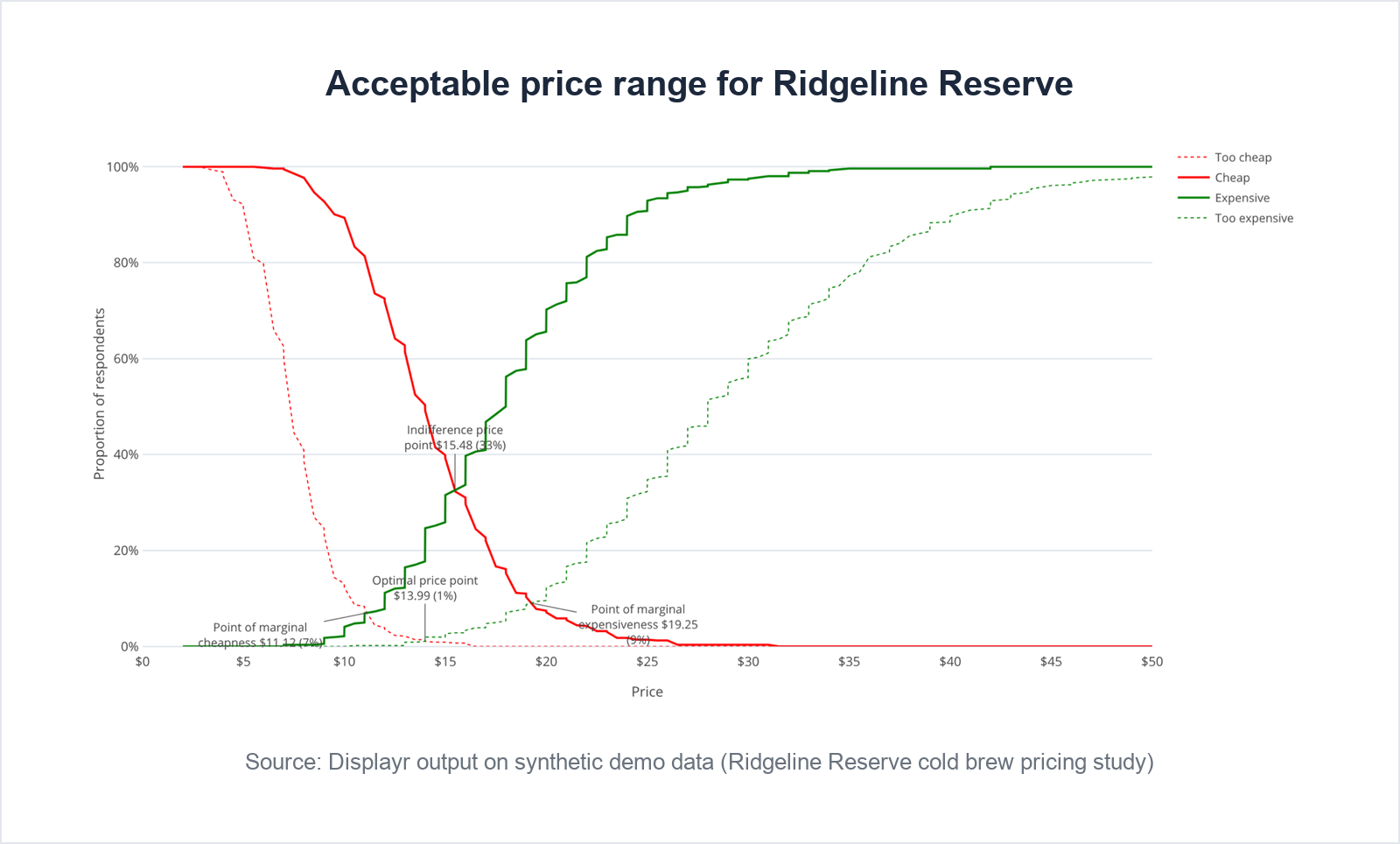
This is the analysis the study was fielded for. Each question becomes a curve on a price axis. The two expensive curves show the share of respondents who named a price at or below each point, so they rise with price. The two cheap curves show the share who named a price at or above it, so they fall. Where they cross is what you report.
- Point of marginal cheapness: where “too cheap” meets “expensive”. Below this price, more people distrust the product than consider it pricey.
- Point of marginal expensiveness: where “too expensive” meets “cheap”. Above this price, more people reject it than see value.
- Optimal price point: where “too cheap” meets “too expensive”. Resistance from both ends is lowest here.
- Indifference price point: where “cheap” meets “expensive”. Roughly what the market considers normal.
To build it yourself in a spreadsheet, list candidate prices from lowest to highest down one column. For each price, calculate four shares of the filtered respondents: those whose too-cheap answer is at or above it, whose cheap answer is at or above it, whose expensive answer is at or below it, and whose too-expensive answer is at or below it. COUNTIF handles each one. Each intersection is the price where a pair of columns swaps order; interpolate between the two rows either side of the swap rather than reading it off the chart. In R, the pricesensitivitymeter package does the same calculation.
The acceptable price range runs from the point of marginal cheapness to the point of marginal expensiveness. Four things go wrong often enough to say out loud. The method measures acceptability, not demand: a price can be acceptable to everyone and bought by no one, which is why the purchase-intent extension below exists. A single overall range hides segments that disagree, so always rerun it by the groups that matter. In categories where nothing is ever “too cheap”, the falling curves are flat and the lower bound is meaningless; say so rather than reporting it. And the optimal price point is the least stable of the four. It sits where two curves cross near the bottom of the chart, where both run almost flat, so small differences in method or sample can move it by a dollar or more. Lead with the range.
If the survey asked purchase intent at each respondent’s own cheap and expensive prices, the Newton-Miller-Smith extension turns the range into a decision. Each answer on the intent scale is converted into a probability of buying, which gives an estimated likelihood to buy at every price; multiplying by price gives a revenue curve. Acceptability tells you where you may price. The revenue curve tells you where you should.
In Displayr
The AI chooses the analysis and interprets the output; Displayr’s built-in Price Sensitivity Meter does the calculating, so the intersections are computed from the cumulative distributions, not read off a chart.
Prompt (Chat)
Run a Van Westendorp Price Sensitivity Meter using the numeric variables Q7 too cheap, Q8 cheap, Q9 expensive and Q10 too expensive, filtered to Consistent price answers. Report the point of marginal cheapness, point of marginal expensiveness, optimal price point and indifference price point in [currency], and state the acceptable price range.
Prompt (Chat)
Create the Van Westendorp chart from the same four numeric variables, filtered to Consistent price answers: the four cumulative curves on a price axis from 0 to [upper price limit] in [currency], with the four intersection points labeled with their names and prices. Title it “Acceptable price range for [product]”.
Set the upper limit just past where the “too expensive” curve levels off. The chart cannot shade the acceptable range; the two labeled points at either end mark it. If a label is cut off at the edge, widen the chart on the page.
Prompt (Chat)
Run the Newton-Miller-Smith extension of the Van Westendorp Price Sensitivity Meter using the numeric variables Q7 too cheap, Q8 cheap, Q9 expensive and Q10 too expensive, with Q11 purchase intent at the cheap price and Q12 purchase intent at the expensive price as numeric variables and a likelihood scale of [one probability per scale point, lowest first]. Show likelihood to buy and revenue by price, and report the price that maximizes trial and the price that maximizes revenue.
The likelihood scale needs exactly as many values as the purchase-intent scale has points. This step, and the two that follow, are also where Displayr’s pricing research tools do their routine work: the same meter, by segment, updated when the next wave lands.
Step 4: cut the range by the groups that matter
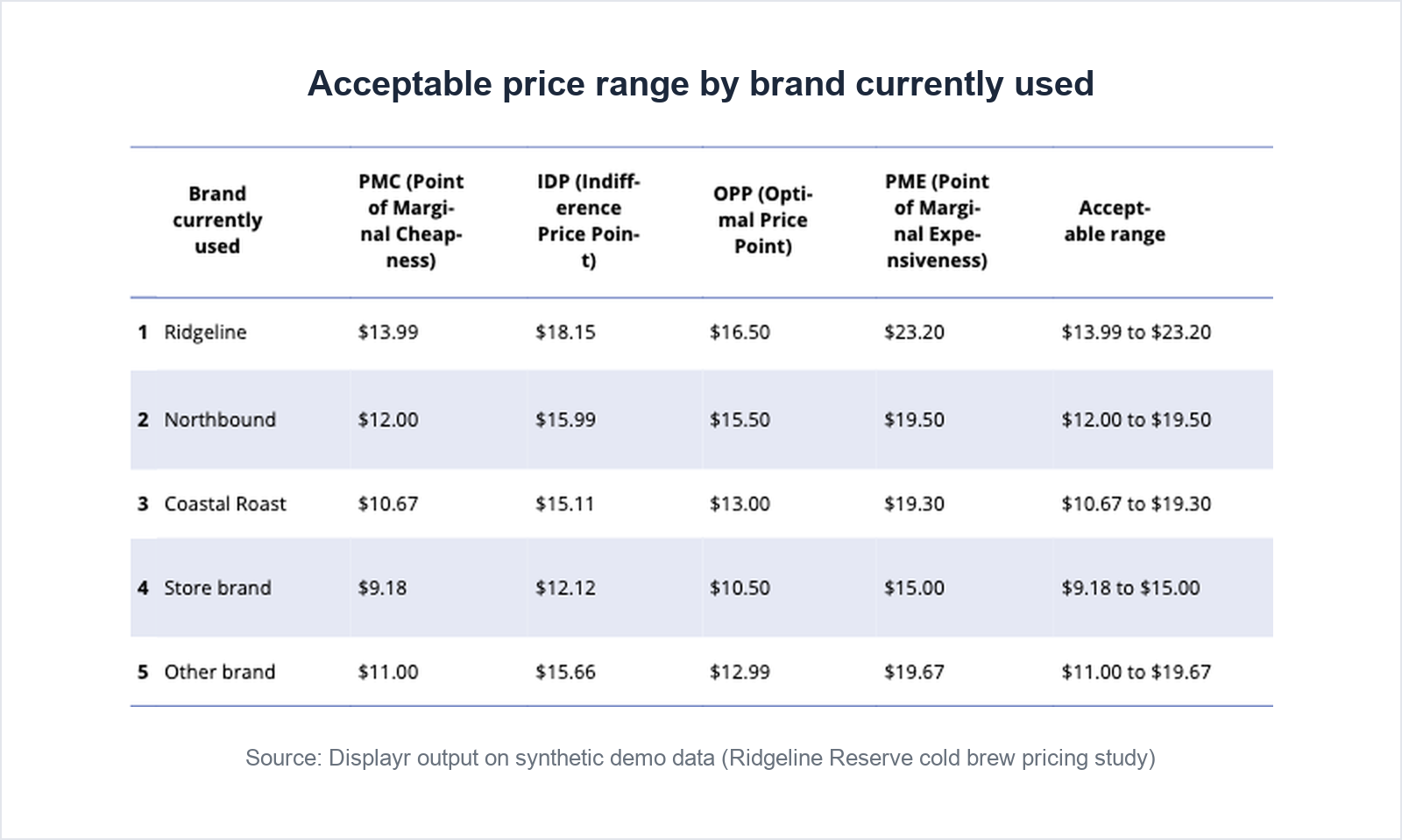
On the demo data the overall range is $11 to $19. That is a headline. The decision usually lives in the difference between current customers and switchers, or heavy and light users. Rerun the whole meter separately for each group that matters and report each group’s base. A segment range read from 60 respondents is a hypothesis, not a finding; say so in the chart footnote rather than letting the committee discover it. Then cut purchase intent by the same groups and test the differences for significance.
In Displayr
Displayr tests every table automatically, so the crosstabs arrive with significance already marked; you only specify testing when the comparison is not a standard one.
Prompt (Chat)
Rerun the Van Westendorp Price Sensitivity Meter separately for each category of Q3 brand currently used, using the numeric variables Q7 too cheap, Q8 cheap, Q9 expensive and Q10 too expensive, filtered to Consistent price answers. Show the four intersection prices and the acceptable range for each brand group in one table. Include the base size for each brand group.
Chat may calculate segment ranges with its own code rather than the built-in meter. If one segment’s optimal price matters to the decision, rerun the meter for that segment from the menu and compare.
Prompt (Chat)
Create a table of Q11 purchase intent at the cheap price (top-2-box version) by Q13 usage frequency, filtered to Consistent price answers.
The power move: who is already priced out
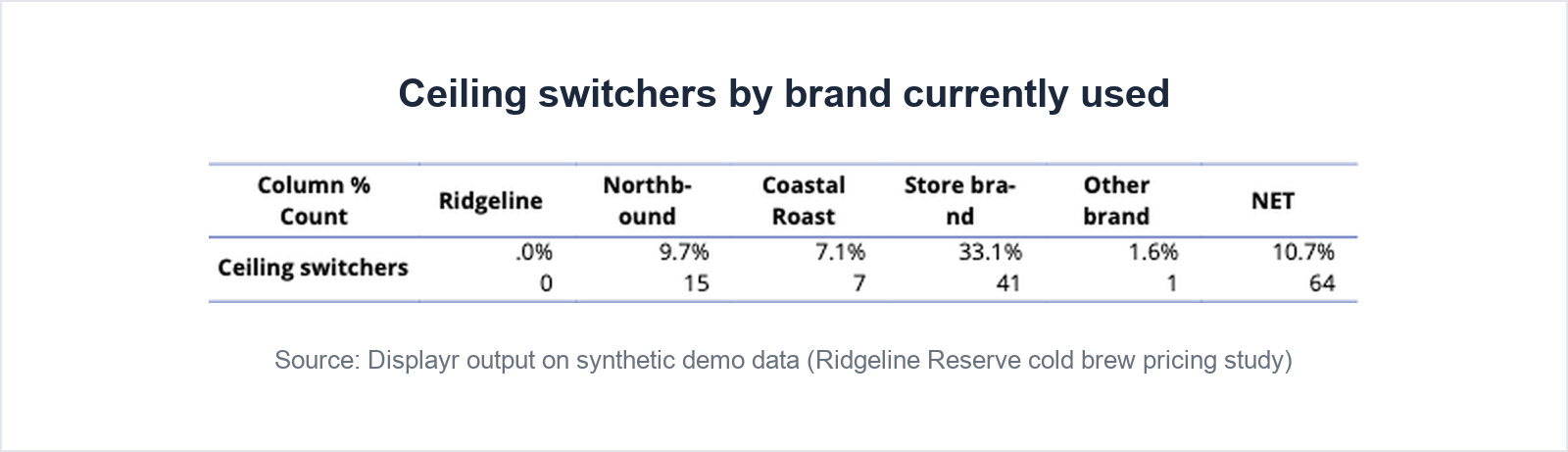
Every pricing deck shows the range. Few show who is already outside it. Create one flag: respondents who use a competitor and whose too-expensive price is below the price you intend to charge. These Ceiling switchers have already told you your price is past their limit. Report them as a count and a percentage, overall and by brand; their size is the sharpest sentence in the report. In the demo data, one in three store brand users is a Ceiling switcher.
In Displayr
Prompt (Chat)
Create a new variable called “Ceiling switchers” that equals 1 when the numeric variable Q10 too expensive is below [current market price] and Q3 brand currently used is not [your brand], and 0 otherwise.
Prompt (Chat)
Show how many respondents are Ceiling switchers, as a count and a percentage of all respondents, in total and by Q3 brand currently used.
Ask for counts and percentages. Left to itself, Chat treats a 0/1 variable as a number and reports its average, which hides how many people are in the segment.
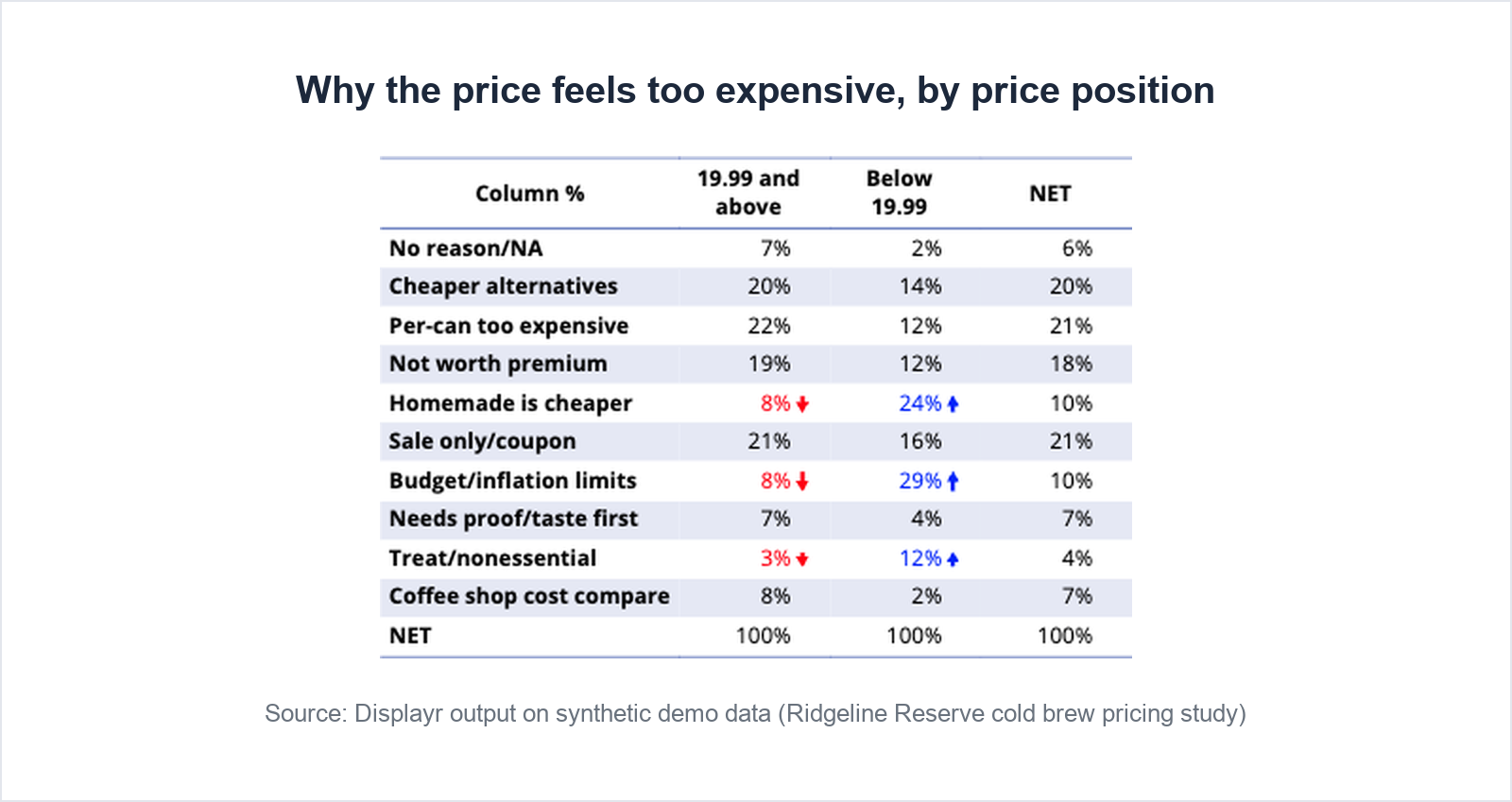
Step 5: find out why the price feels too expensive
The open-ended reasons are where the range gets its explanation. Code them into themes, then treat the themes as a variable you can cut like any other. Split respondents by whether their too-expensive price is below or above the price you intend to charge, and compare the themes. Expect one group to be much smaller than the other, because most respondents sit on one side of the price. Differences in the small group may not reach significance even when they are large, so read them as direction rather than proof.
In Displayr
If the Data Preparation Agent ran in Step 1, the reasons are already categorized, in a new variable ending in “- Categorized”. If not, select the text variable and run Text Categorization from + › Advanced Analysis › Text Analysis. It is a feature, not a prompt, and the coding it produces is kept at the respondent level, so when you merge two themes or move a verbatim, the correction persists.
Prompt (Chat)
Create a table of the themes in Q15 reason too expensive (categorized) by whether the numeric variable Q10 too expensive is below or above [current market price], filtered to Consistent price answers. Include the base size of each column.
Step 6: report it, then let the committee ask their own questions
The report needs four things: the acceptable range and the optimal price, how the range differs by segment, the size of the priced-out segment, and the top reasons the price feels too expensive. Give a base size with every figure. Then make the supporting tables easy to reach, because the first question from the pricing committee will be “what about our heavy users”, and the answer should already be there.
In Displayr
Prompt (Chat)
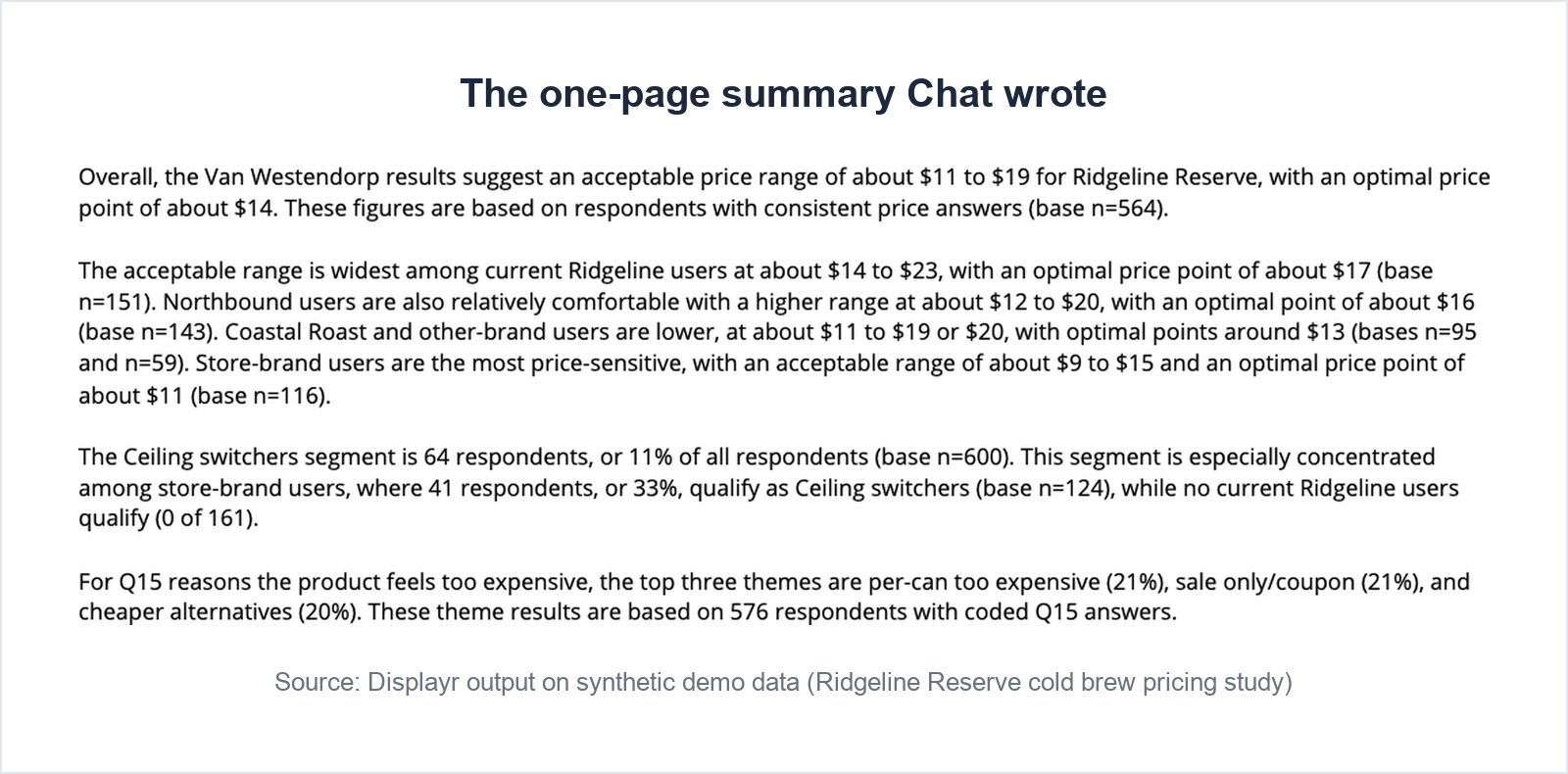
Write a one-page summary of the pricing study covering the acceptable price range and optimal price point, how the range differs by Q3 brand currently used, the size of the Ceiling switchers segment, and the top three themes from Q15 reason too expensive. Use plain language and include the base sizes.
Publish as a dashboard with Report Chat turned on, so the committee can ask their own questions. Pre-build the range-by-segment and purchase-intent tables before publishing, because Report Chat answers from what is on the page.
The next wave, or the next product
Pricing studies repeat: a new SKU, a new market, a post-launch check. Save the filter rule, the segment definitions, the Ceiling switchers rule and the report layout, as a script or a template, so the second study is run with the same definitions as the first. Then the two are comparable, instead of the second being a fresh interpretation of the first.
In Displayr
Everything above stays in the project and reruns on the new file. Save the workflow as a Skill and the next pricing study starts from your method rather than a blank page.
Frequently asked questions
What are the four Van Westendorp questions?
Each respondent gives four prices for the product: the price at which it would be so cheap they would doubt its quality, the price at which it feels inexpensive with no doubts about its quality, the price at which it starts to feel expensive but is still worth buying for its quality, and the price at which it is so expensive that it is not worth buying. Ask them in the same order for everyone, in one currency, as open numeric answers.
How do you read a Van Westendorp chart?
Plot each question as a cumulative curve on a price axis: the two cheap curves fall as price rises and the two expensive curves rise. The acceptable price range runs between the point of marginal cheapness (too cheap meets expensive) and the point of marginal expensiveness (too expensive meets cheap). The optimal price point is where too cheap meets too expensive.
How many respondents does a Van Westendorp study need?
Around 300 consistent respondents gives stable intersection points for an overall range. If you need separate ranges for segments such as current customers and competitor users, plan for 150 to 300 in each segment you intend to report, and treat smaller groups as directional.
What is the difference between Van Westendorp and Gabor-Granger?
Van Westendorp asks open prices and produces an acceptable range; it measures acceptability, not demand. Gabor-Granger shows fixed price points and asks purchase likelihood at each, producing a demand and revenue curve for prices you choose. Many studies run Van Westendorp first to find the range, then Gabor-Granger or conjoint inside it.
Can AI analyze a Van Westendorp survey?
Yes, provided the AI is running a tested implementation of the method on your data rather than describing it from memory. In Displayr, a Chat prompt that names the four numeric price variables runs the Price Sensitivity Meter, returns the four intersection prices and the chart, and the output stays in the project so it can be rerun by segment or on the next wave.
The workflow at a glance
| Stage | In any tool | In Displayr |
|---|---|---|
| Clean | Standard quality checks, plus a filter for price order and plausibility | Data Preparation Agent with two options unticked, plus one Chat prompt |
| Topline | Medians and quartiles of the four prices; brand by price last paid | Chat |
| Money analysis | Four cumulative curves and their intersections; optional revenue curve | Chat, using the built-in Price Sensitivity Meter |
| Cuts | Meter rerun by segment, with bases; purchase intent by usage | Chat (significance testing automatic) |
| Power move | Flag competitor users already priced out; count them by brand | Chat |
| Text | Code the reasons into themes; cut by price position | Text Categorization or the Data Preparation Agent, then Chat |
| Report | Summary with base sizes; supporting tables within reach | Chat, dashboard, Report Chat |
| Reuse | Saved definitions, script or template | Skill |
Try this on your own data
Upload a pricing file, paste the prompts, and see the range in minutes. Free trial, no card.
Displayr picks up where collection ends: field the survey in Qualtrics, SurveyMonkey, Forsta or any platform, then bring the data here.
More in this series: Brand tracking · Concept and ad testing · MaxDiff · Segmentation · NPS and customer satisfaction · Employee satisfaction · Product research · Event feedback
Related: Pricing research software · Text analytics