A brand tracking survey measures the same brand health metrics among the same population at regular intervals, so a business can see whether awareness, liking and preference are moving, and whether its marketing is the reason. The decisions riding on it are large and recurring: whether a campaign is renewed, where next quarter’s media budget goes, whether the agency keeps the account.
Getting an answer out of tracking data is now trivial. Any AI tool will return numbers, a chart and a confident story about why a metric fell. The point is a defensible answer: one that survives the agency whose campaign is being judged, and that still holds in wave 12 when someone asks how the metric was defined in wave 3. Trackers punish sloppiness more than any other study type, because the whole point is comparison over time.
In one paragraph
A brand tracking survey is a repeated survey that measures brand awareness, liking or consideration, preference, brand image and advertising recall for a brand and its competitors among the same target population at fixed intervals. Its purpose is comparison over time, so the questionnaire, the sample definition and the metric definitions must stay constant from wave to wave.
Each step below explains the method first, so it works in a spreadsheet, R or SPSS. A shaded “In Displayr” panel then shows the same step in Displayr, with copy-paste prompts.
What’s in a brand tracking survey?
Trackers vary by category, but the spine is the same whether the brands are banks, burgers or B2B software, because the funnel logic is the same. A typical tracker runs 10 to 15 minutes, covers six to ten brands, and is fielded monthly or quarterly to a fresh sample drawn to the same specification each wave. The questions below are representative wording to adapt, not copy.
| Section | Representative questions | Format |
|---|---|---|
| Screener and category behavior | Which of these have you bought in the past four weeks? How often do you buy [category]? On which occasions did you last buy it? | Pick any; frequency scale |
| Unaided awareness | When you think of [category], which brand comes to mind first? Which other brands can you think of? | Open text, coded to the brand list |
| Aided awareness | Which of these brands have you heard of, even if only by name? | Pick any, brand order rotated |
| The funnel | How well do you know each brand? How do you feel about each brand (hate to love)? Which would you consider next time? Which one do you prefer? | 5-point scales per brand; pick one for preference |
| Brand image | Which of these brands do you associate with each statement? (8 to 12 attributes, such as good value, healthy, traditional, for people like me) | Brand by attribute grid, pick any |
| Usage | Which brands have you bought in the past three months? How many have you had in the past week, at home and out? | Pick any; numeric counts |
| Advertising | Which brands have you seen or heard advertising for in the past month? Have you seen this advertising before today? | Pick any; yes, no, not sure |
| Open-ended diagnostics | What is the main reason you prefer [preferred brand]? What would stop you buying [your brand]? | Open text |
| Classification | Age, gender, region, household, income band, quota variables | Single response |
| Tracking essentials (in the file, not asked) | Interview date or wave, respondent ID, interview length, weight | Date, numeric |
Two rules matter more in trackers than anywhere else. Rotate the brand list and the attribute order every wave, but never change the question wording, the scale points or the screener: a wording change is a new tracker with a short history, however much it looks like the old one. And record the fieldwork dates, because a wave that straddles a price change or a competitor’s launch needs a footnote in every chart it appears in.
The prompts below run on a sample file anyone can open: a cola tracker with 600 interviews from January to September 2024, covering six brands. It is simpler than the full template. It has spontaneous and aided awareness, a hate-to-love attitude scale for each brand, preferred cola, consumption counts, a nine-attribute image grid and one open-ended question, but no weight, no interview length and no consideration question. In every prompt, replace [your brand], [competitor 1] and [competitor 2] with your own brands, and the question names with your own. On the demo file, use Pepsi Max, Coca-Cola and Coke Zero.
In Displayr
The demo file is Displayr’s built-in sample data. In a new document, choose Add data › Sample data › Cola Brand Tracking (9 months). Every prompt below runs on it as written, so you can check your results against the numbers quoted in this article.
Which analysis answers which question?
| Business question | Analysis |
|---|---|
| Where does our brand stand this wave? | Funnel topline: aided awareness, top-of-mind awareness, liking and preference for every brand |
| Is the trend up, down or flat? | Headline metrics by wave, combining months into quarters or rolling averages where waves are small |
| Did this wave’s change actually happen? | Wave-on-wave comparison, with each wave tested against the previous one |
| Where is the change coming from? | Trend decomposition: the same metric by wave within age group, gender or region |
| How are we perceived, and is it shifting? | Brand image attributes for your brand by wave |
| Who are we at risk of losing? | A custom segment of your own fans who also like competitors, sized by wave |
| Why do people choose one brand over another? | Coded open-ended answers, cut by preferred brand |
Step 1: clean the data
Trackers accumulate problems that one-off surveys never see. Check these before anything else:
- Sample size by wave, unweighted and weighted, so a small wave does not masquerade as a trend. If any wave falls below about 150, plan to report quarters or rolling averages rather than single waves.
- Speeders and straight-liners, especially through the brand image grid, where ticking every brand for every attribute, or none, inflates or deflates everyone’s scores.
- Weighting consistency: the same targets every wave, or a documented change.
- Brand list consistency: a brand added in wave 5 has no history and must not appear in a trend as zero.
- Unaided awareness coding: the verbatims are full of misspellings and shorthand, and every one must land on the right brand. A shorthand like “DC” coded to nothing, or “Max” coded to the wrong brand, moves top-of-mind awareness directly.
A practitioner’s rule worth keeping: do not report a wave-on-wave change for any subgroup with fewer than 50 respondents per wave, and treat 30 as a hard floor. Trackers generate small cells fast once you cut by brand and segment, and a 12-point swing on a base of 28 is a coin toss. On the demo file, monthly waves run from 55 to 77 interviews, so the analysis below uses quarters of about 200.
In Displayr
The Data Preparation Agent runs the standard checks: it flags straight-lining and poor-quality text, builds top-2-box and numeric versions of the attitude grid, and codes the open-ended answers. Before it runs, untick two of its options. “Create a better name for the variable sets” strips the question names the prompts below use, and “Delete rows of data where 30% or more of data quality flags are failed” removes respondents without asking. If the file has no interview length, as the demo file does not, it says so and skips the speeder check.
Do not use its coding of unaided awareness for top-of-mind. The agent combines the first, second and third mentions before coding them, which measures total spontaneous awareness, and its categories keep misspellings apart from the brands they mean. Code the first mention separately.
Prompt (Chat)
Create a table of the number of completed interviews by month of the Interview date variable (intdate), and a second table by quarter of the Interview date variable (intdate), so I can check each wave has enough respondents.
Prompt (Chat)
Create a new variable called “Top-of-mind brand” that codes the first mention in spontaneous awareness (q1a_1) to one of these brands: [your brand list]. Treat misspellings and shorthand as the brand they refer to: for example, DC is Diet Coke, Zero is Coke Zero, Max and pp max are Pepsi Max, and Pepsi Lite and Pepsi light are Diet Pepsi. Code anything that cannot be matched as Other. Then show a table of Top-of-mind brand with counts and percentages, and the base size, and list the answers coded as Other.
Read the Other list before going further. On the demo file, Chat put six recognizable answers there, including “peps” and “p max”, which is a cautious call but moves Pepsi and Pepsi Max by a point. Recode any you disagree with, because every miscode carries into the trend.
If your file has a weight, name it in every prompt that follows. The demo file has none.
Step 2: get the topline
The topline is the funnel in the latest wave and the trend of the headline metrics. Report each funnel stage for every brand, and use the top-two boxes of any rating scale, such as like plus love, as the reporting cut. Read the stages together. If top-of-mind awareness moves and liking does not, people are noticing the brand without warming to it, which is a different brief from the reverse.
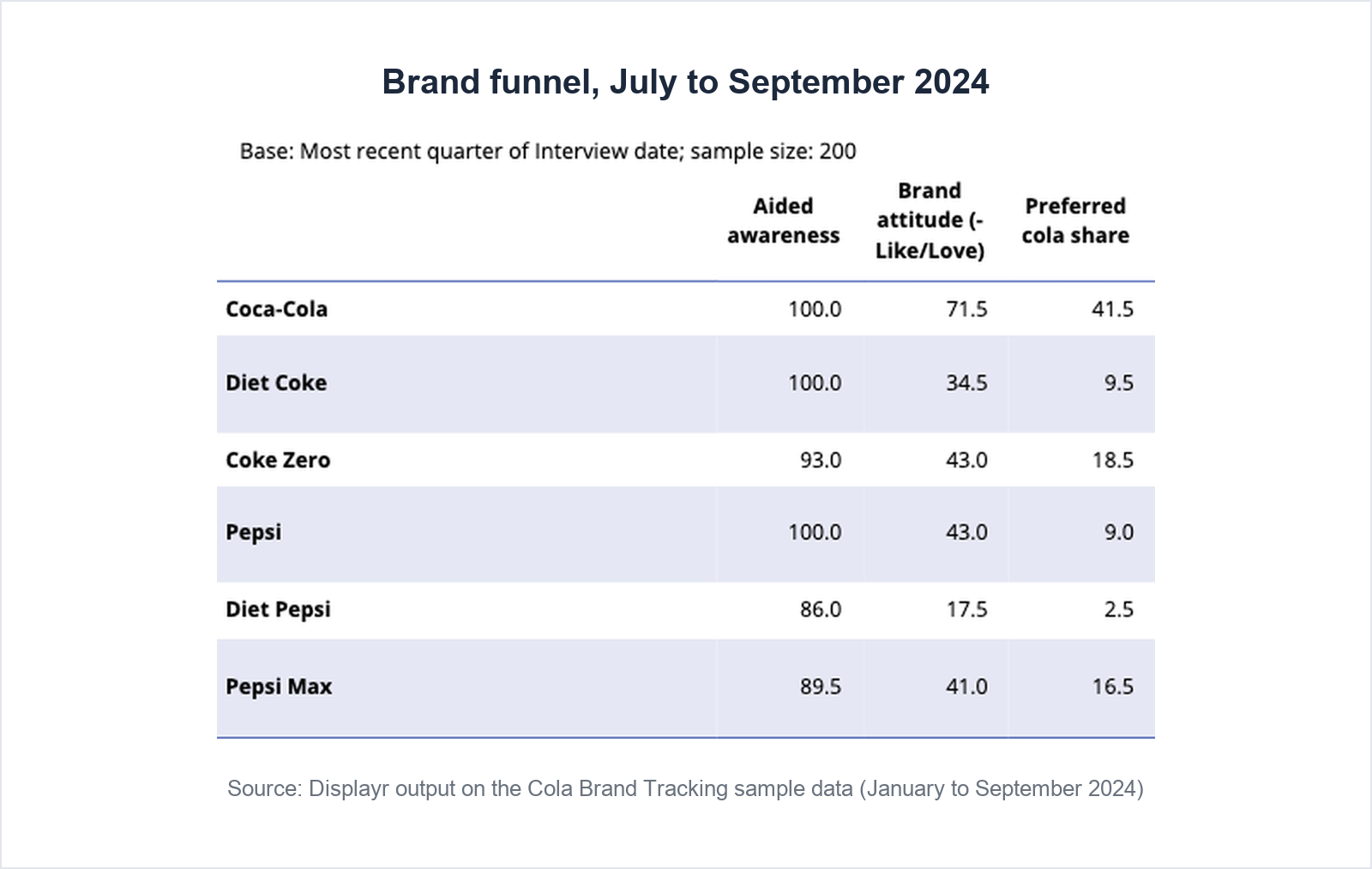
Look at aided awareness once and then mostly ignore it. For established brands it saturates near 100 percent, and on the demo file three of the six brands sit at exactly 100 percent. Once aided awareness passes about 80 percent, top-of-mind awareness and the stages below it carry the trend.
In Displayr
Prompt (Chat)
Create a summary table for the most recent quarter of the Interview date variable (intdate) showing, for each brand, aided awareness (q1b_1 to q1b_6), the top-2-box version of brand attitude (q4a to q4f, Like or Love) and preferred cola (q3). Include the base size.
Prompt (Chat)
Create a line chart of the top-2-box version of brand attitude (q4a to q4f, Like or Love) by quarter of the Interview date variable (intdate) for [your brand], [competitor 1] and [competitor 2], with the y-axis starting at 0.
Prompt (Chat)
Create a table of preferred cola (q3) by quarter of the Interview date variable (intdate), with column percentages and the base size.
Step 3: test wave-on-wave change
This is the analysis a tracker exists for, and the one that is genuinely painful by hand: of the movements this wave, which are real?
A wave-on-wave test takes a proportion, such as the share who name your brand first, in one wave and compares it with the same proportion in the previous wave. It asks whether the difference is larger than sampling variation would produce, given the two sample sizes. In a spreadsheet this is a two-proportion z-test: the difference divided by its standard error, using the pooled proportion and both bases. The output worth reporting is a table of each metric by wave in which every wave is marked against the one before it.
It goes wrong in four ways. The first is testing against the wrong column: the default test on a crosstab compares each column with the total or with every other column, and in a tracker the comparison that matters is this wave against the previous one, so it has to be asked for. The second is ignoring the weights: weighting reduces the effective sample size, sometimes by a third, and a test run on the unweighted count declares differences significant that are not. The third is testing waves that are too small. The fourth is reading every arrow as news: six brands by four metrics is 24 tests a wave, and at the 95 percent level one or two will be significant by chance.
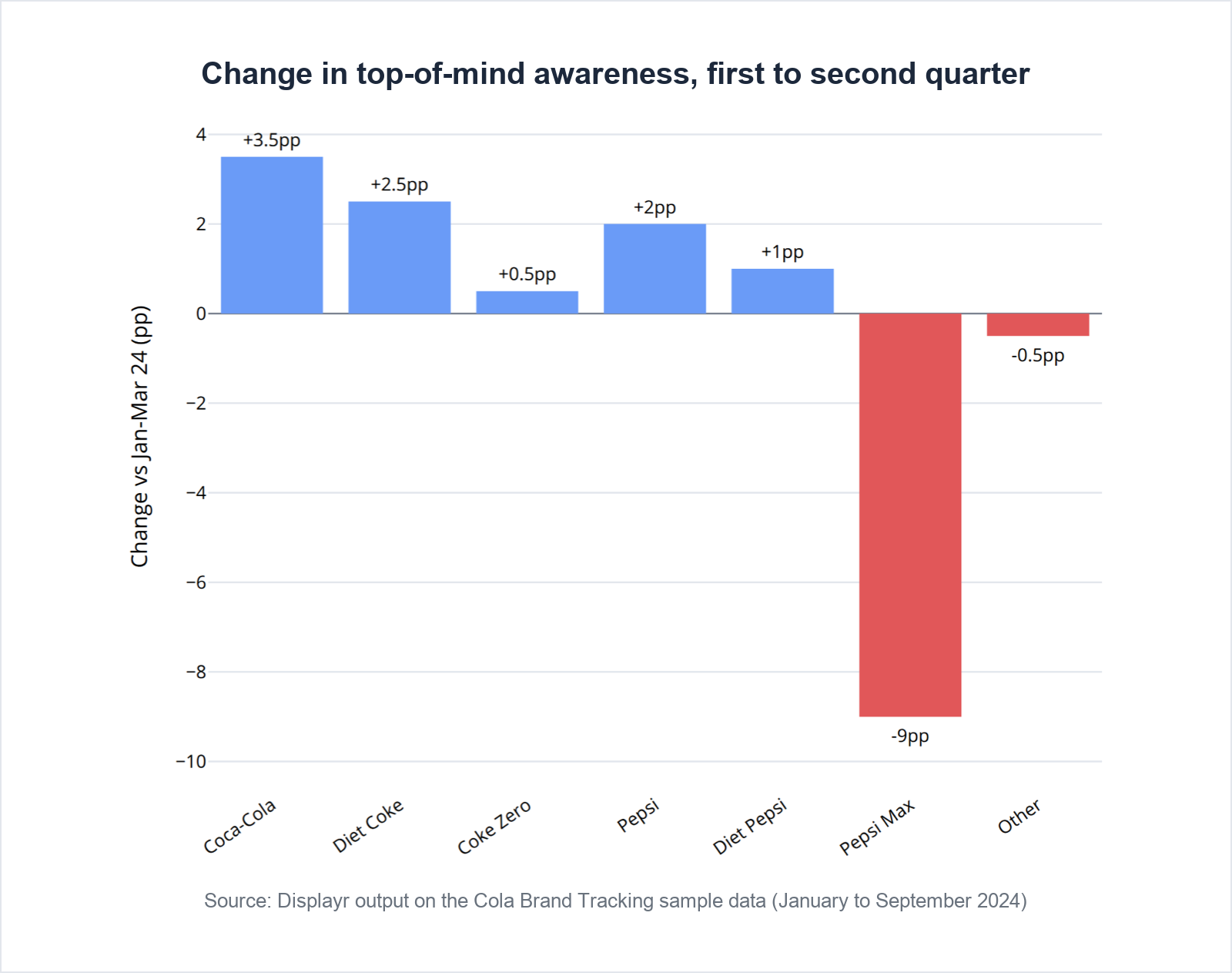
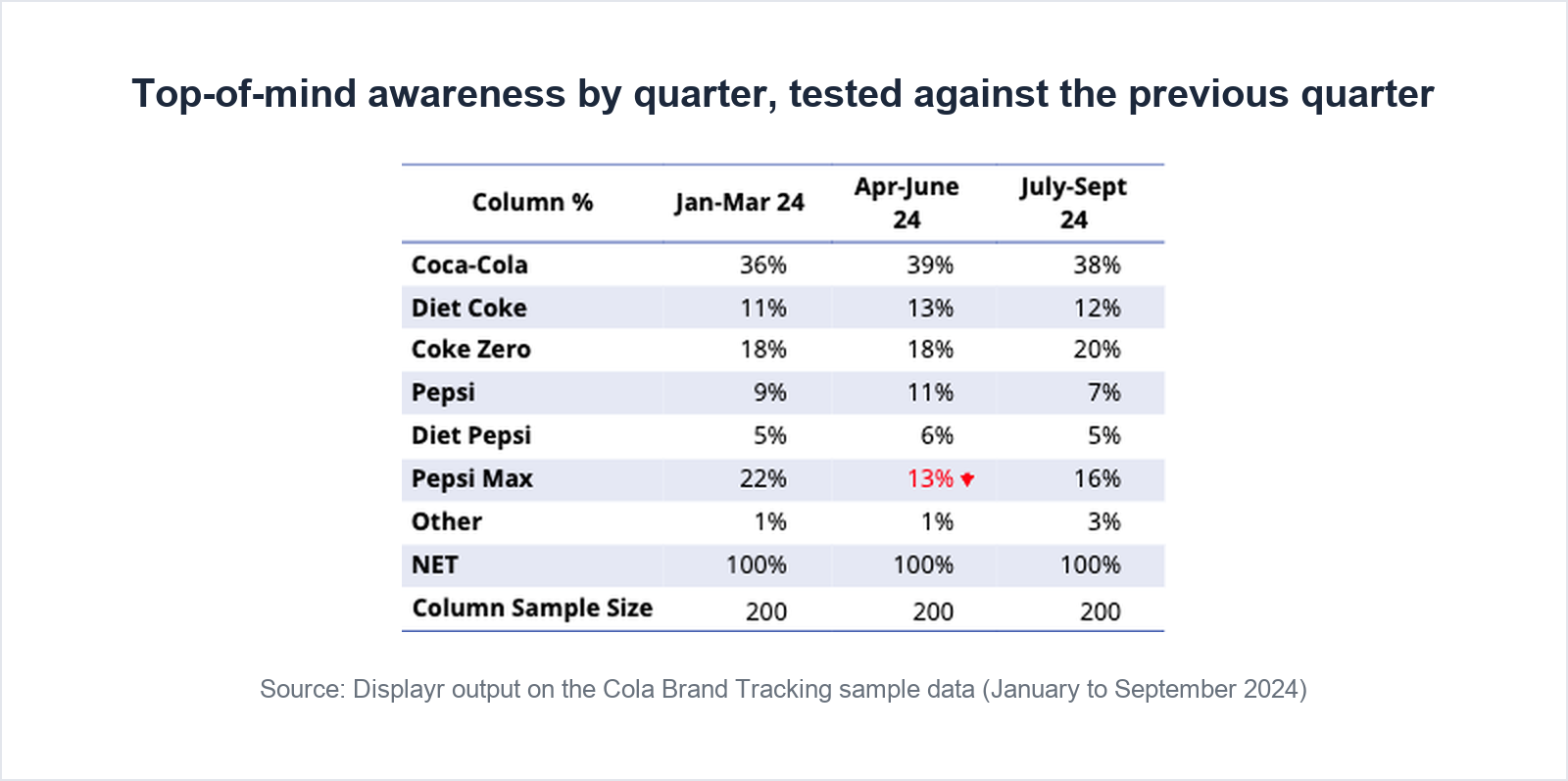
The demo file shows the last two failures side by side. Month on month, the share who like or love Diet Pepsi jumps from 5 percent in August to 25 percent in September, a difference that tests as significant on bases of 55 and 68. Nothing else moves with it, and it is almost certainly noise. Quarter on quarter, liking and preference are flat for every brand. The one change that holds up is Pepsi Max’s top-of-mind awareness, which falls from 22 percent of first mentions in the first quarter to 13 percent in the second, then recovers only to 16 percent. Pepsi Max’s preference and liking dip in the same quarter, which is what makes the movement credible rather than a lone arrow.
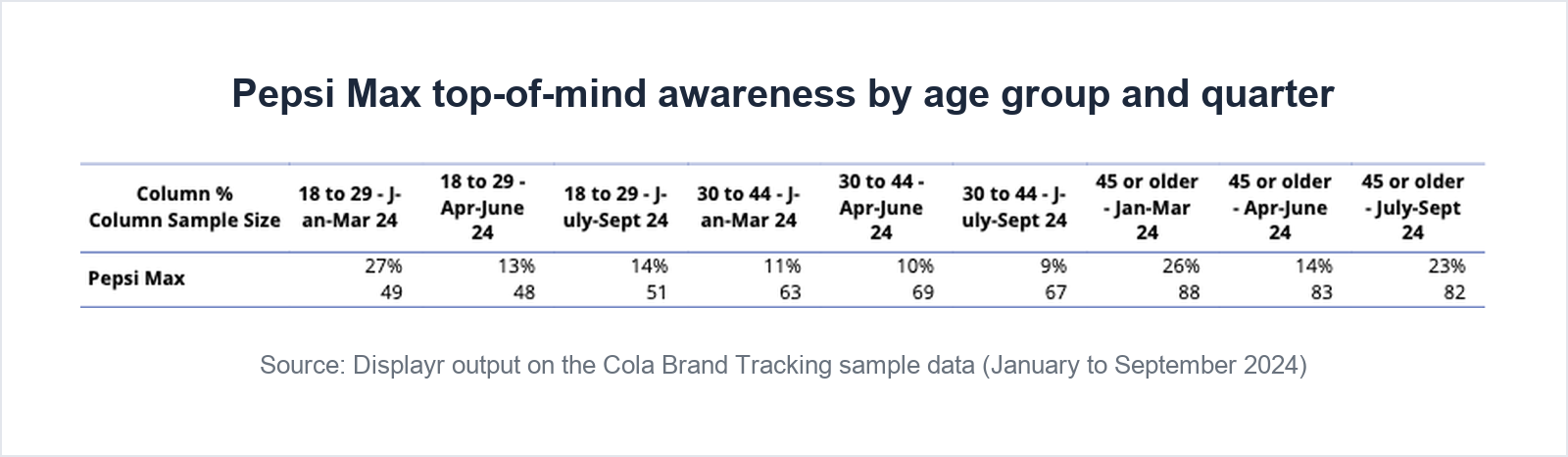
Once a change is confirmed, decompose it. A national decline is almost always one group’s decline, and the same metric by wave within each age group or gender tells you where to look. Read the subgroup cells as direction: on the demo file, each age group has only 50 to 90 interviews a quarter. Look at the recovery as well as the drop. Pepsi Max’s fall shows in under-30s, from 27 to 13 percent, and in the over-45s, from 26 to 14 percent; by the third quarter the over-45s are back to 23 percent while the under-30s are still at 14. A national number recovering by 3 points hides one group that has come back and one that has not.
In Displayr
The AI chooses the analysis and interprets the output; Displayr’s built-in significance testing does the calculating, so the arrows come from tested statistical code rather than a language model doing arithmetic.
Prompt (Chat)
Create a table of the top-2-box version of brand attitude (q4a to q4f, Like or Love) for each brand by quarter of the Interview date variable (intdate), testing each quarter against the previous quarter. Show the Column Sample Size for each column.
Prompt (Chat)
Create a table of Top-of-mind brand by quarter of the Interview date variable (intdate), testing each quarter against the previous quarter. Show the Column Sample Size for each column.
Check the arrows land where the comparison says they should. On the demo file only Pepsi Max’s second quarter is marked, which is what a test against the previous quarter produces; a test against the total would have marked its first quarter instead. And check the base row: a request for “the base size” can return the whole table’s sample, 600, under every column, rather than each quarter’s 200.
Prompt (Chat)
Create a column chart of the change in Top-of-mind brand for each brand between the first and second quarters of the Interview date variable (intdate), labeled with the percentage-point change.
Look at the chart before trusting the reply. On the demo file the first attempt produced an error, and Chat’s reply still described a finished chart. Pasting the error back with a request to fix it produced the right chart in under a minute. The bars are colored by direction, not significance, so say in the caption which change is significant.
Prompt (Chat)
For [your brand], create a table of Top-of-mind brand by quarter of the Interview date variable (intdate) within each age group (d1, grouped into 18 to 29, 30 to 44 and 45 or older) and within each gender (d3). Show the Column Sample Size for each cell.
The full set of tracker analyses is on Displayr’s tracking analysis page.
Step 4: cut the data
Demographic cuts are the standard report. Cuts by funnel position are the interesting ones. Start with the funnel by age and gender for the latest wave, then the image trend for your own brand, then rerun the trend for one segment where it changes the story: your own fans, and how they feel about your closest competitor.
Segment reruns shrink bases fast. On the demo file only 24 to 37 people a quarter prefer Pepsi Max, well below the 50 the rule above asks for, so the trend among them is a hypothesis to watch, not a finding to report. Pool the quarters, or wait for more waves, before saying it out loud.
In Displayr
Displayr tests every table automatically, so these crosstabs arrive with significance already marked; you only specify testing when the comparison is not a standard one, as in Step 3.
Prompt (Chat)
Create a table of the top-2-box version of brand attitude (q4a to q4f, Like or Love) by age group (d1, grouped into 18 to 29, 30 to 44 and 45 or older) and by gender (d3), for the most recent quarter of the Interview date variable (intdate). Show the Column Sample Size for each column.
Prompt (Chat)
Create a table of the brand image attributes for [your brand] (q5a to q5i) by quarter of the Interview date variable (intdate). Show the Column Sample Size for each column.
Prompt (Chat)
For respondents whose preferred cola (q3) is [your brand], create a table of the top-2-box version of brand attitude toward [competitor 2] by quarter of the Interview date variable (intdate). Show the Column Sample Size for each column.
Chat does not warn about small bases on its own. On the demo file the last table rests on 37, 24 and 33 respondents and came back without comment, so the caution has to come from you.
The power move: build a switch-risk segment
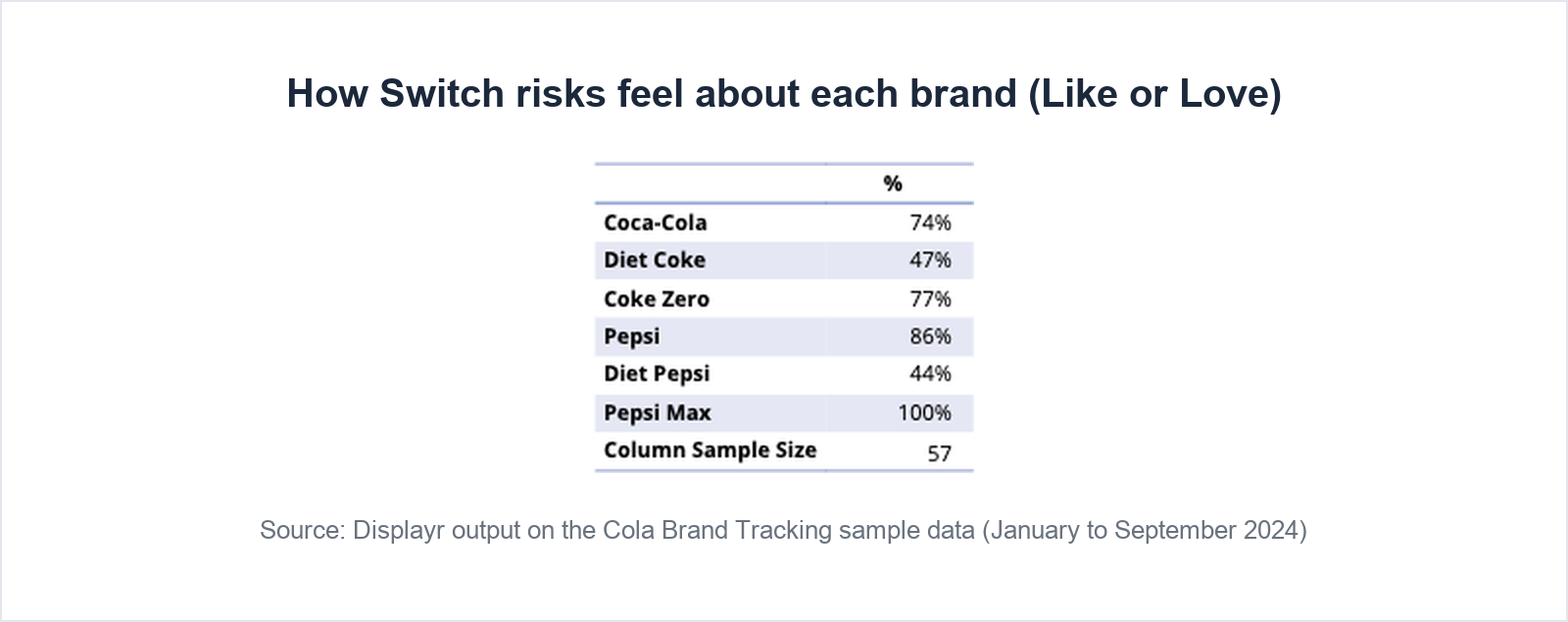
Funnel logic can be combined into one named segment: people who prefer your brand but also like or love two or more of your competitors. Call them switch risks. They have no reason to stay except habit, and their number moves before preference does. Report them as a count and a percentage of your brand’s fans, by wave, and then look at which competitors they like.
On the demo file, 57 of the 94 people who prefer Pepsi Max are switch risks. Most of them also like Pepsi, which is no threat to the company, but 77 percent like Coke Zero, which is.
In Displayr
Prompt (Chat)
Create a new variable called “Switch risks” that equals 1 when preferred cola (q3) is [your brand] and the respondent rates two or more of the other brands Like or Love in brand attitude (q4a to q4f), and 0 otherwise.
Prompt (Chat)
Create a table showing, in total and by quarter of the Interview date variable (intdate), the number of Switch risks, the number of respondents whose preferred cola (q3) is [your brand], and Switch risks as a percentage of them.
Prompt (Chat)
Create a table of the top-2-box version of brand attitude (q4a to q4f, Like or Love) for each brand among Switch risks. Show the Column Sample Size.
Ask for the count by name. Asked for “a count and a percentage”, Chat returned the percentage and the base, which leaves the reader to work out the count. Because the segment is a stored variable with a stored definition, the third-quarter figure is computed exactly as the first-quarter figure was.
Step 5: analyze the open-ends
Open-ended answers are the why behind funnel movements, and the part of most trackers that ends up as an appendix of quotes. Code them into themes, then cut the themes by preferred brand. Check which waves asked the question before trending it: a question asked only in some waves cannot carry a trend, and on the demo file the open-ended question about the difference between cola drinkers was asked in January and February only, so 123 people answered it.
In Displayr
If the Data Preparation Agent ran in Step 1, the answers are already coded, in a new variable ending in “- Categorized”. If not, select the text variable and run Text Categorization from + › Advanced Analysis › Text Analysis. The coding is kept for each response, so when you merge two themes or move an answer, the correction persists into the next wave.
Prompt (Chat)
Create a table of the themes in the main difference between cola drinkers (q6oe, categorized) for respondents who answered the question. Show the Column Sample Size, and state how many respondents answered the question, how many were coded to a theme, and which answers were excluded and why.
On the demo file the theme table’s base was 105, although 123 people answered: about nine answers were non-answers such as “nothing” and “no idea”, and Chat did not say what else was left out. Asking for the counts makes the gap visible.
For multi-market trackers, run Translation on the open-ends first, so every market is coded against one code frame rather than one per language.
Step 6: report and share
The tracker report needs four things: the funnel this wave, which changes are statistically real, where the real ones come from, and the size of the at-risk segment. Give a base size with every figure, and say which movements were tested and did not hold up, because the stakeholder who saw a monthly spike will ask about it. Then make the supporting tables easy to reach, because the first question will be which group drove the change.
In Displayr
Prompt (Chat)
Write a one-page summary of the tracker covering the brand funnel for the most recent quarter (aided awareness, brand attitude Like or Love, and preferred cola), which quarter-on-quarter changes in brand attitude and Top-of-mind brand are statistically significant, where the change in [your brand]’s top-of-mind awareness comes from by age group, including which groups recovered in the latest quarter, and the size of the Switch risks segment. Use plain language, include the base sizes, call each measure by the name used here, and keep what the tables show separate from interpretation.
On the demo file the summary’s figures all traced back to the tables, but it called the liking measure “consideration”, which the survey does not ask, and drew a funnel conclusion the numbers only half support. Naming the measures in the prompt keeps the summary to what was measured.
Publish as a dashboard with Report Chat turned on, so stakeholders can ask their own questions. Pre-build the funnel by age and gender and the quarter-on-quarter tables before publishing, because Report Chat answers from what is on the page.
The next wave
This is where a tracker pays for itself. Save the cleaning rules, the code frame and your corrections to it, the age groups, the switch-risk definition and the report layout, as a script or a template, so the next wave is run with the same definitions as the last. Then the trend is comparable, because nothing was redefined between waves, and a colleague who takes over inherits the recorded work rather than a folder of files and a hope.
In Displayr
Add the new wave’s data and everything above updates against the same definitions. Save the workflow as a Skill and every analyst runs the tracker the same way.
Doing this in Displayr
Two paths. The Research Agent is the fast one: point it at the cleaned file and the research questions (“track brand health for [your brand] against [competitor 1] and [competitor 2] by quarter”), and it drafts the funnel, the trends and a summary for you to review and correct. Chat is the step-by-step path this article follows, and it has one rule: every prompt is self-contained. Name the variables, the brands and the wave every time, because Chat does not carry memory from one request to the next.
Routing, so you don’t write prompts for things that are menus. Every menu opens from the + in the toolbar. The Data Preparation Agent handles the standard cleaning checks and codes open-ended answers. Text Categorization and Sentiment are under + › Advanced Analysis › Text Analysis, and become available once you select a text variable.
Prompts that mention a top-2-box version, or a grouped version such as age groups or quarters, work even when that variable does not exist yet: Chat builds it and says so. It also leaves helper variables behind, some with numeric suffixes, and sometimes builds a second copy of a variable that already exists. Tidy Data Sources before you share the document, or ask Chat to reuse a named variable.
Frequently asked questions
How many respondents does a brand tracking survey need?
Plan the sample around the smallest group you will report, not the total. A national read of 300 to 500 per wave supports brand-level funnel metrics. Reporting by region or age group needs at least 50 per cell per wave, with 30 as a hard floor. Smaller waves can be combined into quarters or rolling three-month averages, which steadies the trend at the cost of reaction time.
How often should a brand tracking survey run?
Monthly or continuous fielding suits categories with frequent purchase and heavy advertising, because it can see a campaign land. Quarterly is enough for considered purchases and slow-moving perceptions. The constraint is sample: pick the frequency you can afford at 300 or more respondents a wave, because a fast but thin tracker cannot tell movement from noise.
What questions are in a brand tracking survey?
A brand tracking survey asks about category behavior (the screener), unaided and aided brand awareness, the brand funnel (familiarity, consideration or liking, purchase intent and preference), brand image on a list of attributes, brands bought recently and most often, advertising recall, reasons for preference as open text, and classification questions. A full representative questionnaire is in the template section above.
What is the difference between unaided and aided awareness?
Unaided, or spontaneous, awareness asks respondents to name brands from memory with no list shown; the first brand named is top-of-mind awareness. Aided awareness shows a list and asks which brands the respondent has heard of. Aided awareness saturates quickly for established brands, often near 100 percent, so top-of-mind awareness and the funnel stages below it carry the trend.
How do you know whether a wave-on-wave change is real?
Test the latest wave against the previous wave, not against the total, and use the weighted data where there is a weight. Treat a difference as real when it is significant at the 95 percent level and either persists or moves with the adjacent funnel metrics. With many brands and metrics, expect one test in twenty to be significant by chance, so a lone arrow is a reason to look harder, not a headline.
The workflow at a glance
| Stage | In any tool | In Displayr |
|---|---|---|
| Clean | Wave sizes; speeders and straight-liners; code the first mention to brands and check what went to Other | Data Preparation Agent with two options unticked, plus two Chat prompts |
| Topline | Funnel for every brand this wave; liking and preference by wave | Chat |
| Wave-on-wave | Each wave tested against the previous one; decomposition by age and gender | Chat, using built-in significance testing |
| Cuts | Funnel by age and gender; image trend; competitor liking among your fans | Chat (significance testing automatic) |
| Power move | Flag fans who also like competitors; count them by wave | Chat |
| Text | Code the open-ends; check which waves asked them | Text Categorization or the Data Preparation Agent, then Chat |
| Report | Summary with bases, including the changes that did not hold up | Chat, dashboard, Report Chat |
| Next wave | Saved definitions, script or template | Skill |
Try this on your own data
Upload your latest wave, paste the prompts, and get a significance-tested wave-on-wave read before the next status meeting. Free trial, no card.
Displayr picks up where collection ends: field the tracker in Qualtrics, Forsta, Decipher or any platform, then bring the data here.
More in this series: Concept and ad testing · MaxDiff · Van Westendorp pricing · Segmentation · NPS and customer satisfaction · Employee satisfaction
Related: Tracking analysis · Brand analytics